If you’ve been asking what are AI tools for business, the short answer is: they’re software applications that use artificial intelligence to handle tasks that previously required manual effort, human judgment, or both. The longer answer matters more, though, because the category has exploded into hundreds of specialized tools across every business function imaginable, from writing emails to generating financial forecasts.
The real challenge isn’t finding AI tools. It’s figuring out which categories actually apply to your work and how specific tools fit into the systems you already run. A chatbot builder solves a completely different problem than an AI image generator, yet both get lumped under the same umbrella. Without clear categorization, you end up either overwhelmed by options or stuck experimenting with tools that don’t move the needle.
That’s exactly what we break down at Enplugged, practical, workflow-focused guidance on choosing and using AI tools that match real business needs. In this guide, we’ll walk through the major categories of AI business tools, give concrete examples in each, and explain the specific use cases where they deliver actual results. By the end, you’ll have a clear framework for identifying which tools deserve your attention and which ones you can skip.
Why AI tools matter for modern businesses
The business landscape has shifted in a concrete, measurable way over the past few years. Tasks that once required dedicated staff or expensive agencies, such as writing first drafts, answering customer questions, sorting data, or scheduling content, now get handled in minutes by software that costs less than a single employee’s monthly lunch budget. That shift matters whether you’re running a five-person team or a solo operation, because your competitors are already using these tools, and the productivity gap between businesses that adopt AI and those that don’t compounds quickly.
When one person can produce the output that used to require three, you stop competing on headcount and start competing on leverage.
What AI tools actually change at the operational level
Understanding what are AI tools for business means looking past the surface-level claims and at what actually changes in your day-to-day work. The biggest shift isn’t speed alone. It’s the removal of bottlenecks that used to depend on a specific person being available, trained, and focused. When your email sequences, social captions, customer support responses, and financial reports all have automated assistance behind them, the work that genuinely requires your judgment gets more of your time. You stop spending energy on repetitive output and redirect it toward decisions that move your business forward.
This matters most for small teams and solo operators who wear multiple hats. A freelancer using AI writing and scheduling tools can now manage a content calendar that previously required both a content manager and a social media coordinator. That isn’t an exaggeration. It’s a structural change in what’s possible at each staffing level, and it directly affects your ability to grow revenue without proportionally growing your overhead.
Why the cost and access picture has changed
AI tools are no longer reserved for companies with dedicated technology budgets or in-house engineering teams. Most of the leading tools now operate on subscription models that start under $50 per month, with free tiers widely available for smaller workloads. That pricing structure means a small business owner gets access to the same underlying technology that enterprise teams use, just packaged in a simpler, more accessible interface.
The accessibility shift also means the barrier to starting is genuinely low. You don’t need a data science background or IT support to run most of these tools effectively. Many connect directly to the platforms you already use, such as your email provider, customer relationship management system, or social media accounts, through built-in integrations or automation connectors. Microsoft has integrated AI directly into its Office suite, which means millions of businesses already have AI capabilities inside tools they pay for every month without even realizing it.
The compounding return on early adoption
There’s a practical timing argument here that goes beyond curiosity. Businesses that integrate AI tools early build internal workflows and institutional knowledge around those tools faster than competitors who wait. The first few months of using an AI writing assistant or an automated reporting tool feel like learning. After six months, that same tool becomes a core part of how your team operates, and the efficiency gains stack.
Late adopters don’t just start from zero on the tool itself. They start from zero on the workflows, prompts, integrations, and team habits that make the tool actually useful. That’s the real cost of waiting, not the subscription fee, but the compounded operational advantage your competitors build while you’re still evaluating options.
How AI tools for business work in practice
Understanding what are AI tools for business moves from abstract to useful once you see the mechanics behind them. Most business AI tools are built on large language models, machine learning algorithms, or computer vision systems that have been trained on massive datasets. What you actually interact with is a simplified interface that feeds your inputs into that system and returns an output, whether that’s a draft, a prediction, a classification, or an automated action.
The input-output loop you work with every day
Every AI tool in your stack operates on the same fundamental loop: you provide input, the system processes it, and you receive a structured output. In a writing tool, your input might be a brief description of a blog topic. The output is a working draft. In a customer service chatbot, your input is the conversation history and intent rules you configure. The output is a response sent to a customer without your involvement.
The key variable in this loop is how much control you have over the configuration. Some tools give you minimal settings and handle everything automatically. Others let you define tone, data sources, decision thresholds, and approval steps in detail. Knowing where a tool sits on that spectrum tells you a lot about how much oversight it needs from your team before you can trust what it produces.
The tools that deliver the most value are rarely the most complex ones. They’re the ones that remove a specific, repeatable task from your plate without introducing new ones.
Where AI tools connect to your existing systems
Most business AI tools don’t operate in isolation. They plug into your existing software stack through native integrations, APIs, or automation platforms. Your AI writing tool might connect directly to your content management system. Your AI email tool might pull data from your customer relationship management platform to personalize sends at scale.
Google has built AI features directly into Workspace products like Docs, Sheets, and Gmail, which means AI assistance is already embedded in tools your team likely uses every day. That pattern of embedding AI into existing platforms is how most businesses actually begin using these tools without realizing they’ve made a meaningful technology shift. Adoption happens gradually, one integrated feature at a time, and the cumulative effect on your output and efficiency is where the real impact shows up.
Common categories of AI tools for business
When people ask what are AI tools for business, they usually expect a single type of tool, but the reality is a wide spectrum of categories organized around specific business functions. Grouping tools by what they actually do for your operations cuts through the noise and makes it far easier to identify where to start. Each category targets a distinct workflow, and understanding the boundaries between them keeps you from buying overlapping tools or missing a gap that’s costing you real time.
The fastest way to waste money on AI tools is to adopt them randomly rather than mapping them to the specific functions in your business that need the most support.
The core functional categories
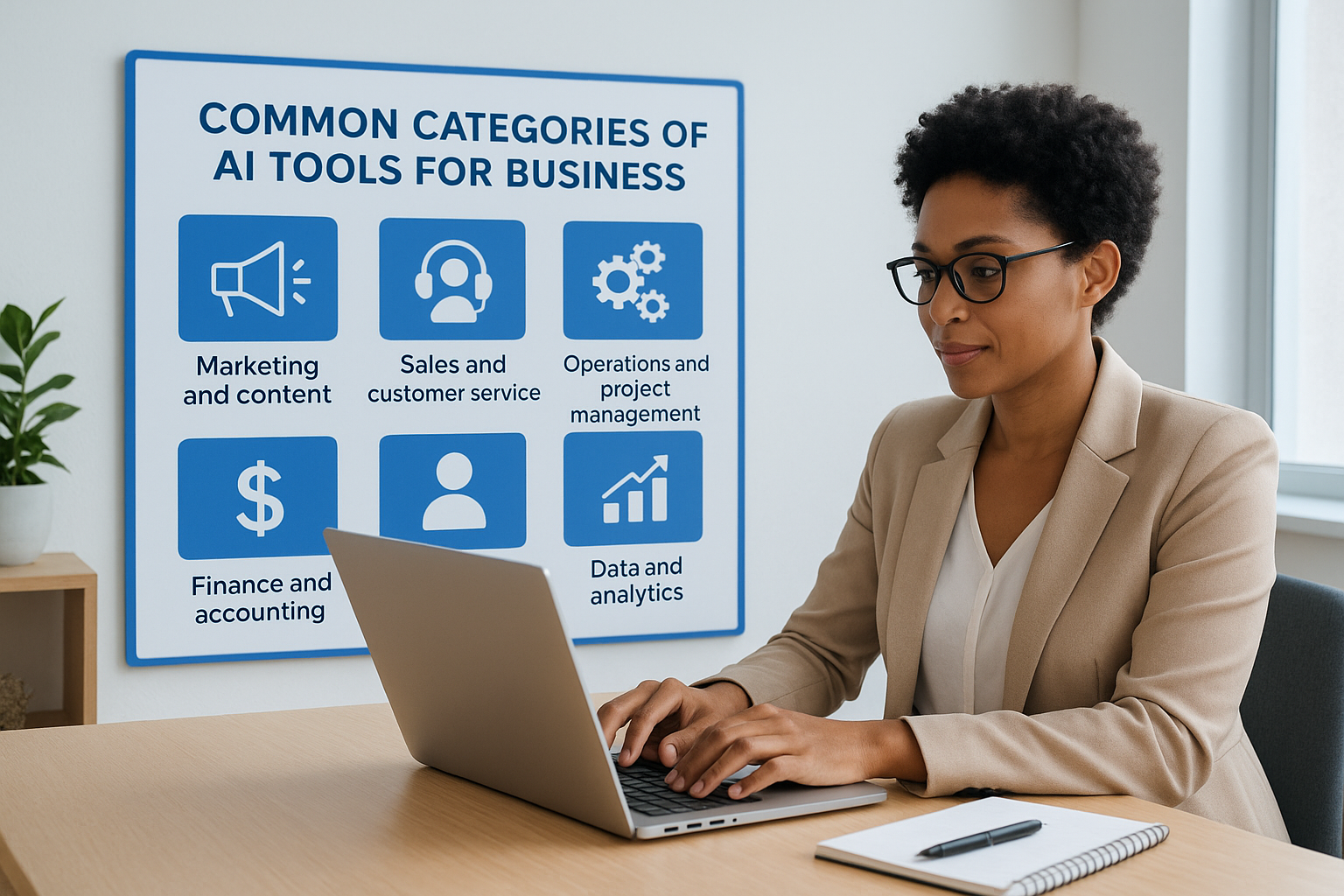
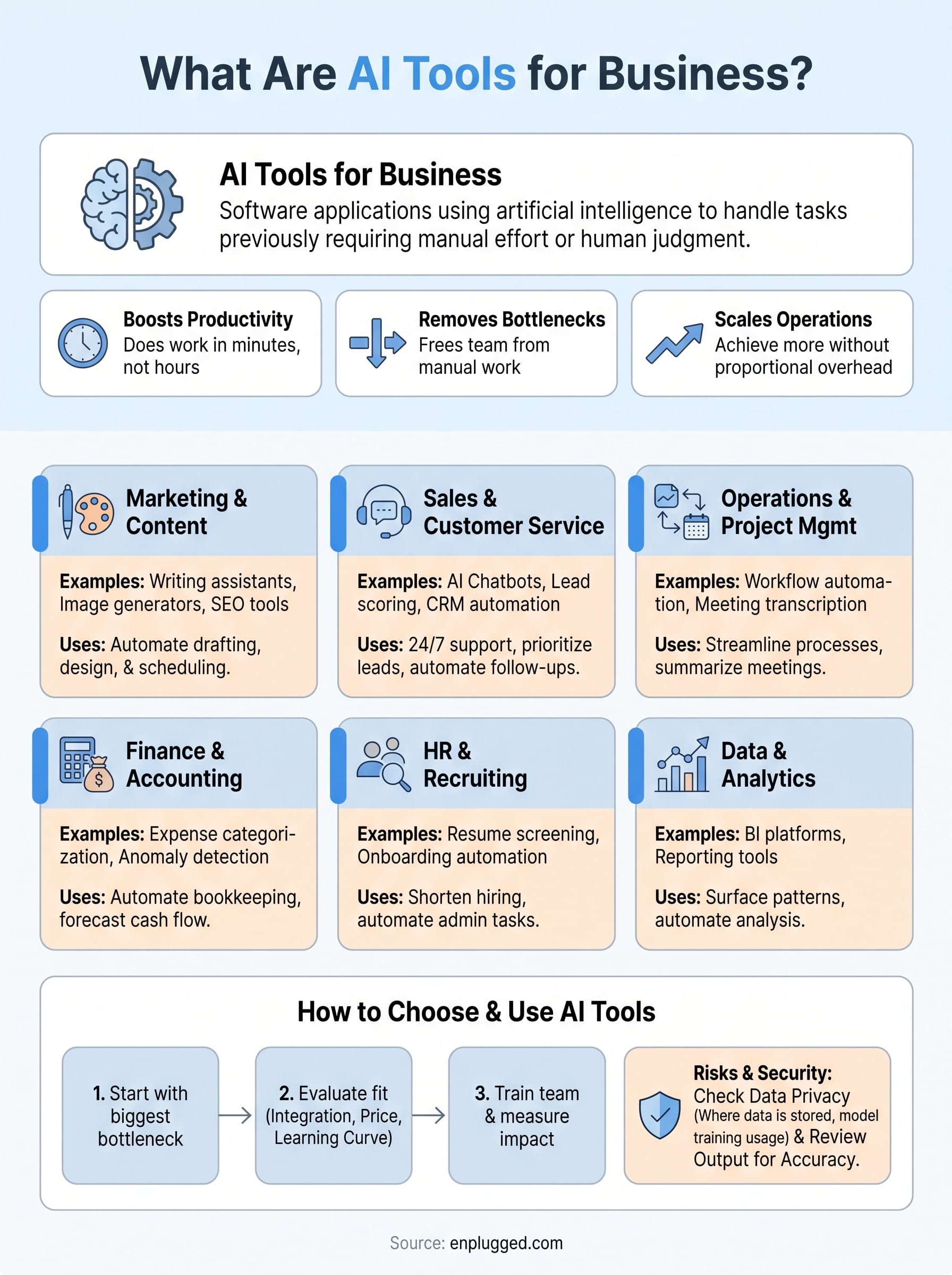
Most business AI tools fall into one of six broad functional areas. Each area maps to a recognizable department or workflow that you either manage yourself or delegate to someone on your team:
- Marketing and content: Writing assistants, image generators, SEO tools, social media schedulers, and email campaign builders that automate and accelerate output
- Sales and customer service: AI chatbots, lead scoring platforms, CRM automation, and conversation intelligence tools that handle repetitive customer touchpoints
- Operations and project management: Workflow automation, task prioritization, meeting transcription, and scheduling tools that reduce administrative load
- Finance and accounting: Expense categorization, forecasting, anomaly detection, and invoice processing tools that reduce manual bookkeeping
- HR and recruiting: Resume screening, onboarding automation, and employee engagement tools that shorten hiring cycles
- Data and analytics: Business intelligence platforms and reporting tools that surface patterns in your data without requiring manual analysis
How the categories interact with each other
No category operates in complete isolation inside a real business. A content tool that generates blog posts might feed directly into an SEO analytics tool that measures ranking performance, which then informs what content topics your marketing team prioritizes next month. Understanding these connections helps you build a stack where tools reinforce each other rather than sitting in separate silos.
Smaller teams typically start with one or two categories that address their biggest bottlenecks, then expand as those tools become stable habits. That approach produces better results than trying to overhaul every function at once, because it gives you time to evaluate what’s actually working before committing to more tools and more subscription costs.
Marketing and content AI tools
Marketing is where most businesses first encounter what are AI tools for business in a practical, hands-on sense. Writing, design, and distribution tasks make up the bulk of most marketing workloads, and they’re also the most repetitive. AI tools in this category target that repetition directly, letting you produce more output without proportionally increasing the hours you put into production.
Writing and copy tools
Writing assistants handle the first-draft problem that slows down almost every content operation. These tools take a brief input, such as a topic, a tone preference, and a few keywords, and return a structured draft that you edit rather than build from scratch. That shift from blank page to editing mode cuts production time dramatically for blog posts, email campaigns, ad copy, and landing pages.
The value isn’t in publishing what the AI writes verbatim. It’s in the hours you recover when you’re no longer staring at a blank document.
Your editing pass is still essential, because AI writing tools miss brand voice nuance, produce generic phrasing without your intervention, and occasionally get facts wrong. Treat the output as a rough draft rather than finished copy, and the time savings hold up across almost every content format your marketing team produces.
Visual and design AI tools
Visual content creation used to require either design skills or an agency relationship. AI image generators and design platforms have changed that equation for small business owners who need branded graphics, social media visuals, and product images without a dedicated designer on staff. You describe what you need, and the tool returns options you adjust and use directly.
Template-based AI design tools go further by letting you feed in your brand colors, fonts, and logo once, then generate consistently branded assets at scale. Adobe has built generative AI directly into its Creative Cloud products, which means teams already using those tools can access AI-assisted design without switching platforms or adding another subscription.
SEO and distribution tools
SEO tools powered by AI analyze search intent, suggest keyword clusters, audit existing content, and flag gaps in your coverage. These platforms save hours of manual keyword research by surfacing what your audience is actually searching for and mapping those terms to actionable content opportunities.
Distribution tools extend that leverage further by scheduling and repurposing content across channels automatically once you’ve produced it, keeping your publishing cadence consistent without requiring daily manual effort from your team.
Sales and customer service AI tools
Sales and customer service represent two of the highest-leverage areas when you’re figuring out what are AI tools for business. Both functions involve repetitive, high-volume interactions that drain time from your team and create delays for customers. AI tools in this category handle that volume automatically, responding to customers, qualifying leads, and updating your records without waiting for a human to get to the next task on the queue.
AI chatbots and automated support
Chatbots have moved well past simple FAQ scripting. Modern AI-powered chatbots understand conversational context, handle multi-step questions, route complex issues to human agents, and integrate with your order management or ticketing systems to pull real-time data into their responses. That means a customer asking about a delayed shipment or a billing issue gets a useful answer at 2 a.m. without anyone on your team being awake.

The businesses that benefit most from AI customer service tools are the ones that map their most common support requests before deploying anything, because that clarity drives better configuration from day one.
Deploying a chatbot without clear intent mapping produces a frustrating customer experience and creates more escalations than it prevents. Spend time identifying your top ten most frequent support questions, build those flows first, and expand only after the core experience is reliable. That approach keeps the tool useful rather than becoming another thing your customers complain about.
Lead scoring and CRM automation
Lead scoring tools use behavioral and demographic signals to rank your inbound leads automatically, so your sales team spends time on prospects most likely to convert rather than manually sorting through every contact in the pipeline. When a prospect visits your pricing page three times, opens every email you send, and matches your ideal customer profile, the AI flags them as high priority without your team having to notice the pattern themselves.
CRM automation extends that logic further by triggering follow-up sequences, updating contact records, and logging activity based on rules you configure once. Microsoft has built AI-assisted CRM features directly into Dynamics 365, and similar capabilities are available across most major CRM platforms at various price points. Your sales cycle gets shorter because no lead sits cold due to a missed follow-up, and your team’s time concentrates on conversations rather than data entry.
Operations, finance, and HR AI tools
When people explore what are AI tools for business, they often focus on marketing and sales while overlooking the back-office functions that quietly consume the most administrative time each week. Operations, finance, and HR each carry a high volume of repetitive, rules-based tasks that AI handles well, from routing work requests to categorizing transactions to screening job applications. Addressing these functions with the right tools frees up the hours your team currently burns on work that produces no direct business value on its own.
Workflow and project management tools
AI-powered workflow tools do more than assign tasks. They analyze patterns in how work moves through your team and surface bottlenecks before they cause delays. If one stage of your approval process consistently slows down, a smart workflow platform flags it and suggests rebalancing the load. That kind of visibility used to require a dedicated operations manager reviewing dashboards manually.
The biggest operational gains come not from automating individual tasks, but from eliminating the handoff delays between them.
Meeting transcription and summarization tools handle another major time sink by turning recorded calls into structured notes, action items, and follow-up assignments automatically. Microsoft has integrated AI transcription directly into Teams, which means teams already using that platform can activate these features without adding another subscription to their stack.
Finance and accounting automation
Finance AI tools target the manual work that sits between your transactions and your actual decision-making. Expense categorization, invoice processing, and anomaly detection all run automatically once you configure the rules and connect your accounts. Instead of reviewing every line item manually, you review flagged exceptions, which typically represent a fraction of total transaction volume.

Cash flow forecasting tools go further by pulling historical data and current pipeline information together to project your financial position weeks or months out. That gives you enough lead time to make adjustments rather than reacting after a shortfall has already appeared in your bank account.
HR and recruiting tools
AI tools in HR reduce the time between posting a role and making a hire by automating resume screening, scheduling coordination, and initial candidate communication. Your recruiting process moves faster because the system handles the volume work while your team focuses on evaluating the candidates who actually make it through the first filter.
Onboarding automation tools extend that efficiency into the first weeks of employment by triggering document requests, training assignments, and system access provisioning automatically based on the role and start date you configure.
How to choose the right AI tools for your business
Understanding what are AI tools for business is one thing; picking the right ones for your specific situation is another. The market is crowded, and most tools market themselves as essential, which makes it easy to sign up for five subscriptions in a week and see meaningful results from none of them. The selection process works better when you apply a clear set of criteria before you open a single free trial, rather than chasing features or responding to whatever tool is trending in your industry feed.
Start with your biggest bottleneck
Before you compare features or read any product page, write down the three tasks in your business that consume the most time per week relative to the value they produce. These are your strongest candidates for AI assistance, because that’s where a tool delivers a measurable return rather than a marginal convenience. If you spend six hours a week writing social captions, that’s a stronger case for a content AI tool than any feature comparison sheet could make on its own.
The right AI tool is the one that removes a specific, repeatable burden from your workflow, not the one with the longest feature list.
Map each bottleneck to one of the functional categories covered earlier in this guide before you start evaluating specific products. That mapping step prevents you from adopting a project management AI when your real problem is customer response time, or a design tool when your actual constraint is lead follow-up speed.
Evaluate fit before you commit
Once you’ve identified the right category, narrow your options by checking three things: integration with your existing software stack, pricing structure, and the learning curve your team can realistically absorb right now. A tool that doesn’t connect to the platforms you already use creates more manual work than it saves, regardless of how capable it looks in a product demo.
Most leading AI tools offer free trials or free tiers that give you enough runway to test whether the output quality and workflow fit match your actual operations. Use that window to run a real task through the tool rather than a scripted demo scenario, because real tasks surface the limitations that polished marketing materials never show. Also confirm that the vendor publishes clear data privacy and security documentation before you connect anything sensitive, especially if the tool will process customer records or financial data. Microsoft publishes detailed security and compliance documentation for its AI-powered products, which gives you a useful benchmark for what responsible vendors should provide.
How to implement AI tools without chaos
Knowing what are AI tools for business only gets you so far. The gap between selecting a tool and actually getting value from it is where most implementations break down. Businesses that rush the rollout skip the foundational steps that determine whether the tool sticks, and they end up with subscriptions that go unused and workflows more fragmented than before. A structured implementation approach takes longer on the front end but saves you from the expensive reset that follows a chaotic launch.
Start with one tool and one process
The single fastest way to derail an AI implementation is trying to change too many things at once. Pick one tool that targets your highest-priority bottleneck and deploy it against a single, clearly defined process before expanding anywhere else. That constraint forces clarity: you define what success looks like for this specific workflow, measure the before-and-after honestly, and build confidence in the approach before adding complexity.
Running a controlled rollout also exposes integration issues early, when they’re easier to fix, rather than halfway through a broader deployment when reverting is painful and costly.
Train your team before the tool goes live
No AI tool delivers results without the people using it understanding what it does, what it can’t do, and what good output looks like when it comes back from the system. Skipping this step is why teams end up publishing AI-generated content with obvious errors or approving automated customer responses that don’t match your brand’s voice.
A brief training session that walks through real examples from your own workflows does more than any vendor tutorial ever will.
Spend at least one session reviewing outputs together before the tool handles anything customer-facing or financial. That shared calibration builds a consistent quality standard and prevents the individual variation that quietly undermines trust in the tool over time.
Measure impact and adjust
Once the tool is running, track the specific metric that motivated the adoption in the first place. If you deployed an AI writing tool to reduce content production time, measure that directly. If you launched a chatbot to reduce support ticket volume, check that number weekly for the first month.
Adjustment cycles are normal and expected after real-world use reveals gaps that weren’t visible during your trial period. Most tools require prompt refinement, rule updates, or minor integration tweaks before they run reliably inside your actual workflow rather than just a controlled test scenario.
Risks, security, and compliance basics
Understanding what are AI tools for business includes understanding what can go wrong when you deploy them without the right guardrails. Most of the risks in this category aren’t exotic or theoretical; they’re the straightforward result of connecting powerful systems to sensitive data without first confirming what those systems actually do with that data. Taking an hour to review the basics before you integrate any tool into your operations costs far less than recovering from a compliance violation or a customer data breach after the fact.
Data privacy and what you’re agreeing to
When you connect an AI tool to your customer records, email list, or financial data, you’re extending your own data governance obligations to a third-party system. Before you authorize any integration, read the vendor’s data processing agreement and privacy policy closely enough to answer three specific questions: where your data is stored, whether it’s used to train the vendor’s models, and what happens to it if you cancel your subscription. Many free or low-cost tiers include clauses that allow your inputs to feed model training, which can create compliance problems if those inputs include personally identifiable information covered by regulations like GDPR or CCPA.

Treating the terms of service as optional reading is how businesses accidentally violate data protection laws they didn’t know applied to them.
Google and Microsoft both publish detailed data processing addenda for their AI-enabled products, which give you a concrete example of what responsible vendor documentation looks like. Use those as your benchmark when evaluating smaller vendors that may not offer the same level of transparency.
Output accuracy and liability
AI tools produce confident-sounding output that is sometimes wrong, incomplete, or outdated. In a marketing context, that might mean a factual error in a published post. In a financial or legal context, it can mean an incorrect figure in a report that informs a real decision. You remain responsible for everything your business publishes or acts on, regardless of which tool generated the underlying content.
Build a review step into every workflow where AI output touches customers, financial records, or compliance-sensitive documents. That step doesn’t need to be exhaustive, but it does need to exist. The businesses that run into the most trouble with AI tools are the ones that automate the review out of the process entirely in the name of speed, and then absorb the cost of the errors that follow.
FAQs about AI tools for business
These questions come up repeatedly when businesses start evaluating AI software for the first time. The answers below address what are ai tools for business at the practical level, cutting through the confusion that tends to slow down adoption before it even starts.
What separates AI tools from regular software?
Standard software follows fixed rules and produces the same output every time you give it the same input. AI tools learn from patterns in data and can handle variable, unstructured inputs like natural language, images, or audio in ways that traditional software cannot. That difference is what allows an AI writing assistant to generate a coherent draft from a two-sentence brief rather than requiring you to fill out a rigid template.
The distinction matters because it sets realistic expectations: AI tools handle ambiguity better than standard software, but they also require more judgment from you during review.
Do you need technical skills to use AI tools?
Most business AI tools require no coding, IT background, or data science knowledge to operate. The leading tools are designed for business users, not engineers, and they expose configuration options through visual dashboards and plain-language prompts. You do need enough familiarity with your own workflows to set up the tool correctly and recognize when an output misses the mark, but that’s a business skill rather than a technical one.
Are AI tools safe to connect to your business data?
Safety depends entirely on which tool you choose and how carefully you review the vendor’s data policies. Reputable vendors, including those building AI into products from Microsoft and Google, publish detailed documentation on data storage, processing, and retention. Smaller or free-tier tools sometimes include clauses that allow your inputs to train their models, which can create compliance problems if those inputs include customer data subject to GDPR or CCPA. Always read the data processing agreement before connecting anything sensitive.
How much do AI tools for business typically cost?
Pricing ranges from free to several hundred dollars per month, depending on the category and the scale of your usage. Most tools offer a free tier or a trial period sufficient to evaluate real-world fit before you commit. The more relevant cost question is total return on investment: a $50 monthly subscription that saves your team ten hours of repetitive work per week is a straightforward trade, while a $200 tool that only shaves off thirty minutes delivers far less value regardless of its feature set.
Where to go from here
Now you have a clear picture of what are ai tools for business: software that automates repetitive tasks, removes bottlenecks, and lets your team focus on work that requires actual judgment. The categories covered here span every major business function, and each one connects directly to a workflow you’re probably managing manually right now.
The next practical step is picking one category that matches your biggest operational drain and testing a single tool against a real process before expanding. Trying to fix everything at once produces worse results than solving one problem well and building from there.
For deeper, category-specific guidance on tools across writing, design, email, and automation, Enplugged covers each area with practical comparisons and workflow-focused recommendations built for small teams and business operators. Start there to find the specific tools that fit the work you’re actually trying to get done.
Leave a Reply